
Building a profitable AI music brand on Spotify is becoming one of the biggest opportunities in the creator economy in 2026. With the rise of AI music generators, anyone can now create professional music and publish it on Spotify without being a musician.
In this guide, you’ll learn how to build an AI music brand on Spotify step-by-step, generate songs with AI tools, and publish them to streaming platforms to start generating Spotify streams.
Why AI Music Works on Spotify
Spotify has hundreds of millions of users who listen to music every day. A large portion of those streams comes from playlist-style music such as study music, phonk beats, chill music, or gym motivation playlists. People use these playlists while studying, working, driving, or training, which means these types of tracks can generate thousands or even millions of streams over time. This is where AI music creates a new opportunity. With tools like AI music generators, you can create professional tracks without being a musician and publish them as part of an AI music brand on Spotify.
Spotify pays artists based on the number of streams their songs receive. On average, the platform pays around $3–$5 per 1,000 streams. That means if your songs reach 100,000 streams or more, they can start generating real income. By creating multiple tracks and publishing them under a music brand, it becomes possible to build a catalog of AI music that generates passive income from Spotify streams over time.
Now that you understand how the opportunity works, the first step is to generate the music for your playlist using AI.
Step 1 — Build the AI Music
Before generating the music, the first thing we need to decide is the type of music brand we want to build. Most successful Spotify AI music brands are built around broad niches that already have massive streaming demand. Instead of trying to compete with famous artists, the strategy is to create playlist-style music that people listen to every day.
The three niches that work extremely well for this system are shown below:
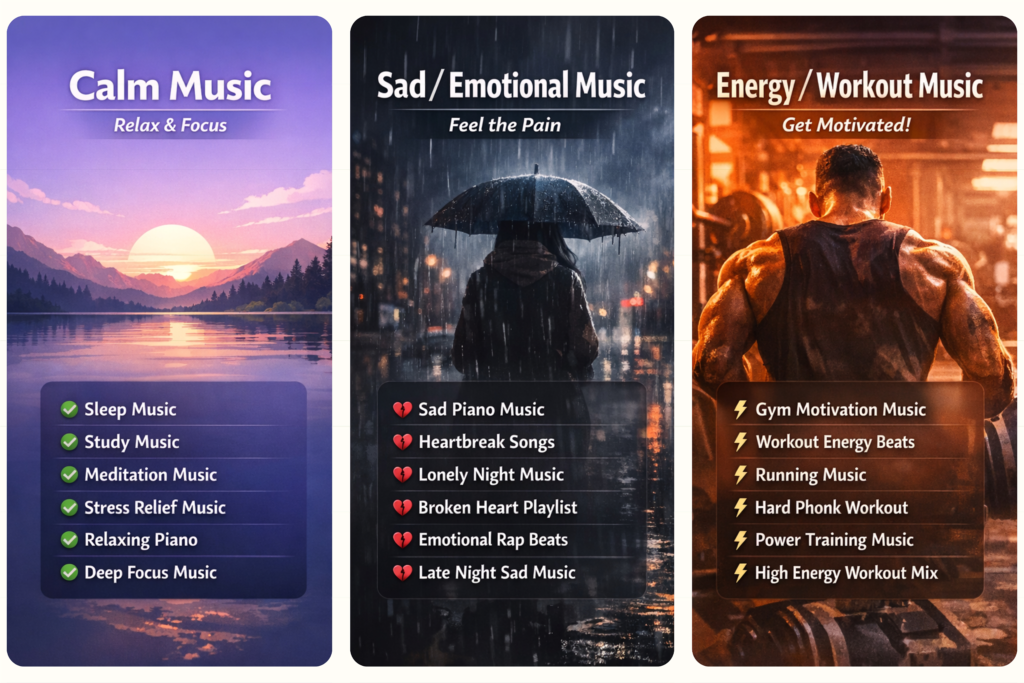
These niches generate millions of daily streams because people constantly search for this type of music while studying, working, driving, or going to the gym.
Once you choose your niche, you can start generating the music ideas using AI.
Prompt 1 — Generate Music Ideas From a Playlist Name
This prompt will generate 10 song concepts designed for a streaming playlist. You simply replace the playlist name and run the prompt.
You are a professional music label creative director.
Your job is to generate 10 unique music ideas designed for a streaming playlist.
PLAYLIST NAME: [PLAYLIST NAME]
For each idea generate only:
1. Track Title
2. Music Style / Genre
3. Short Concept (1 sentence describing the feeling or theme of the track)Rules:
• Titles must sound like real songs on streaming platforms
• Avoid generic names like “Track 1”
• Make titles emotional, cinematic, or powerful depending on the playlist
• The idea must clearly match the playlist mood
• Mix different styles when possible (piano, ambient, rap beats, phonk, etc.)Return the results as a clean numbered list from 1 to 10.
Prompt 2A — Generate a Vocal AI Music Prompt
This prompt converts a music idea into a MusicGPT generation prompt for a vocal track. Simply paste one of the ideas generated earlier.
You are a professional AI music producer.
Convert the following music idea into a high-quality prompt that can be used in an AI music generator like MusicGPT to create a vocal track.
Music Idea: [PASTE MUSIC IDEA HERE]
Create a detailed music generation prompt including:
• genre and style
• emotional tone
• instruments and production style
• song atmosphere
• vocal style (male, female, emotional, rap, soft, powerful, etc.)
• structure of the track (intro, verse, chorus, outro)Rules:
• The music must sound modern and professional
• Focus on strong atmosphere and emotion
• Make the vocals match the mood of the track
• Avoid overcomplicated instructionsReturn ONLY the final MusicGPT generation prompt.
Prompt 2B — Generate an Instrumental AI Music Prompt
This version generates instrumental tracks without vocals
You are a professional AI music producer.
Convert the following music idea into a high-quality prompt that can be used in an AI music generator like MusicGPT to create an instrumental track.
Music Idea: [PASTE MUSIC IDEA HERE]
Create a detailed music generation prompt including:
• genre and style
• emotional tone
• instruments
• atmosphere
• production style
• structure of the track (intro, main section, variation, outro)Rules:
• The track must be fully instrumental (no vocals)
• Focus on cinematic sound and immersive atmosphere
• Use instruments that match the playlist mood (piano, ambient pads, phonk bass, synths, etc.)
• Make the music feel professional and suitable for streaming playlistsReturn ONLY the final MusicGPT generation prompt.
Step 2 — Build the AI Music Brand
Building your AI music brand is simple. You can brainstorm a name yourself or use tools like Namelix by typing keywords such as “calm AI music” to generate unique brand names.
Next, create a professional logo using Leonardo AI with a simple prompt. like this one :
Minimalist logo icon for [BRAND NAME], abstract calm AI music symbol, modern clean design, soft gradients, centered, no text, no letters, icon only, 4K, vector style
In just a few minutes, you’ll have your AI music brand name, logo, and tracks ready—so you can move on to publishing your music on Spotify.
Step 3 — Publish the Ai Music Everywhere
Spotify doesn’t allow direct uploads, so you’ll need a music distributor like RouteNote (free, takes 25%) or DistroKid ($24/year, keep 100%).
Upload your track, add your brand name, choose the “New Age” genre, and generate a cover image using AI. Then enter your real name as the songwriter and submit your music.
After 12–24 hours, your track will appear on Spotify (it may take a bit longer to go fully live).
Next, create a Spotify for Artists account to claim your profile. Customize it with your logo, banner, and bio to make it look like a real brand.
Finally, create multiple playlists in your niche (like sleep or focus music), add your tracks, and organize everything using Linktree.
This sets up your full AI music system—ready for the part where you actually start getting streams and making money.
The Spotify Money System (Golden Part)
Because you made it this far, you just unlocked the most important part. the traffic system that actually brings streams and money.
Let’s start with YouTube. First, generate an image that represents your AI track using ChatGPT or Google Gemini. Then, edit it in Canva if needed. After that, go to Kling AI and use the image-to-video feature. Upload the same image as the start and end frame to create a smooth loop, and describe a subtle movement. Set the duration between 5 to 10 seconds.
Now take that loop video into your editing app, add your AI music, and repeat the loop across the full timeline. Keep it simple. You can add text like “Full playlist on Spotify — [YOUR SPOTIFY NAME]” every few minutes, but don’t overdo effects since people usually play these videos in the background while sleeping or studying.
Once your video is ready, use this prompt inside Google Gemini to generate your SEO title, description, and tags:
Act as a YouTube SEO expert specialized in AI music and long ambient videos.
Generate a high-CTR, SEO-optimized YouTube package for my music video.Track Name: [TRACK NAME]
Playlist Name: [PLAYLIST NAME]
Spotify / Linktree URL: [YOUR LINK]I want:
- A viral YouTube title (optimized for search + high CTR)
- A long SEO-optimized description with keywords (including a CTA to check the full playlist on Spotify using my link)
- Relevant SEO tags (high-ranking + niche-specific)
Make it rank next to top videos in this niche. Keep it natural, not spammy, and optimized for YouTube algorithm.
Now for short-form content. Cut your video into multiple short clips and add reaction videos on top to make them more engaging. You can get reaction clips here:
👇🎬👇
[reaction clips]
Add simple text like “Kai Cenat reacts to my music” and keep it clean. Post one video per day at the beginning, and tell people to check your full playlist through your bio link (Linktree).
Once you start getting views, increase to 3–5 posts per day, and repost your best-performing videos as YouTube Shorts.